
CHANGHORN
Automation spare parts keep production lines moving when a sensor fails, a drive overheats, or a relay stops responding. In a busy factory, one small component can halt an entire process. The missing part may be no larger than a matchbox, yet its absence can delay shipments, waste materials, and increase maintenance pressure.
This guide explains what automation spare parts include and how experienced teams source them safely. Typical examples include PLC modules, servo motors, proximity sensors, HMIs, circuit breakers, cables, and pneumatic components. Each item requires careful checking. Part numbers, voltage ratings, firmware versions, connector types, and revision codes must match the installed system. A similar-looking component may not perform safely.
Details matter.
Reliable sourcing usually begins with equipment manuals, maintenance records, and the machine builder’s specifications. Authorized distributors often provide stronger traceability, warranty support, and product documentation. Reputable independent suppliers may also help locate discontinued parts, but buyers should verify condition, origin, testing, and return terms. Photos alone are not enough. Counterfeit or refurbished components can appear convincing while failing under heat, vibration, or continuous duty.
There is no universal purchasing shortcut. A low price may hide long lead times or uncertain quality. My experience with industrial maintenance suggests that accurate records reduce rushed decisions, although records are often incomplete. This guide also examines practical checks for compatibility, stock planning, supplier credibility, and lifecycle risk. The goal is not merely to buy a replacement, but to restore reliable operation with evidence-based decisions.
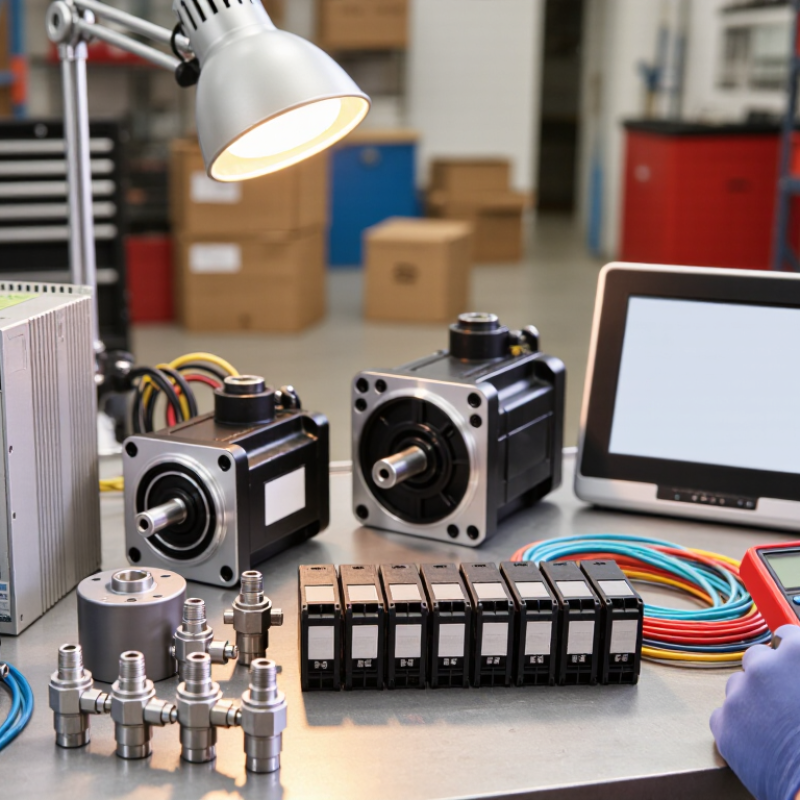
Automation spare parts are replacement components used to keep industrial machines running safely and accurately. They include sensors, relays, circuit breakers, power supplies, servo drives, valves, cables, and operator panels. A spare part may be small, but its failure can stop an entire production line. In practical maintenance work, technicians often store fast-wearing items near the control cabinet. Other parts remain sealed until a rare fault occurs. This distinction matters because humidity, dust, and age can damage unused components. Automation spare parts are not simply extra inventory. They are a risk-control resource matched to specific equipment, electrical ratings, software versions, and operating conditions.
Reliable sourcing begins with accurate identification. Record the component number, revision, voltage, current, connector type, and machine location. A photograph helps, but it should not replace the nameplate or technical drawing. Check whether the part is new, refurbished, or previously installed. That detail affects testing, warranty, and expected service life. Ask suppliers for traceable documentation and inspection records. A low price may hide outdated firmware, missing accessories, or weak packaging. We have seen parts arrive with bent pins after careless shipping. It was avoidable, yet easy to overlook. Compatibility should be verified before purchase, not during an emergency repair.
Automation spare parts are replacement components that restore a machine after failure or planned maintenance. In operating factories, the most frequent failures often involve sensors, input/output modules, relays, and contactors. Sensors sit near heat, dust, oil, and vibration. Their lenses collect dust, while cables may develop hidden breaks. Input/output modules can lose individual channels. A single damaged channel may stop an otherwise healthy production line. Relays, contactors, and fuses also age under repeated switching.
Power supplies and variable-speed drives commonly require replacement after electrical stress or poor cooling. Drives often show warning codes before stopping completely. Cooling fans and capacitors can weaken gradually. Human-machine interfaces may suffer from damaged screens, worn buttons, or internal power faults. Actuators, solenoid valves, and pneumatic fittings need attention when movement becomes slow or inconsistent. Cables and connectors deserve attention too. Vibration loosens terminals. Small faults spread quickly.
Effective sourcing starts with accurate equipment records. Record the exact part number, revision, voltage, current, connection type, and communication protocol. For older equipment, confirm firmware and compatibility before ordering. A visually similar module may not operate safely in the same cabinet. Use suppliers that provide test reports, traceable inspection records, and clear return terms. Ask about storage conditions, especially for electronic boards and seals. In my experience, emergency purchases cost more and invite mistakes. Still, no process is perfect. A spare can remain unused while another weak component fails first. Review failure history every quarter. This often reveals patterns.
| Automation Component | Primary Function | Common Replacement Triggers | Typical Failure Symptoms | Key Sourcing Details | Recommended Stock Level | Replacement Priority |
|---|---|---|---|---|---|---|
| Proximity and Photoelectric Sensors | Detect the presence, position, distance, or movement of objects. | Mechanical impact, contamination, cable damage, electrical overstress, or aging of the sensing element. | False detection, missed detection, unstable signals, or no output. | Sensing range, output type, supply voltage, connector, mounting style, and environmental rating. | High | High |
| Relays and Contactors | Switch electrical loads and isolate control circuits from power circuits. | Contact wear, arcing, coil failure, overheating, excessive switching cycles, or loose terminals. | Load remains on or off, chattering, welded contacts, or coil does not energize. | Coil voltage, contact arrangement, current rating, switching category, mounting method, and auxiliary contacts. | Medium–High | High |
| Push Buttons and Selector Switches | Provide manual operator commands such as start, stop, reset, or mode selection. | Worn contacts, broken actuators, damaged seals, contamination, or repeated mechanical operation. | Intermittent commands, stuck operation, failure to latch, or unresponsive controls. | Contact configuration, maintained or momentary action, panel cutout size, ingress protection, and operating voltage. | Medium | Medium |
| Power Supplies | Convert incoming electrical power into stable DC power for control equipment. | Overtemperature, overload, voltage surges, capacitor aging, poor ventilation, or unstable input power. | Low or fluctuating output voltage, repeated resets, alarm indication, or complete loss of control power. | Input range, output voltage and current, overload protection, mounting type, certifications, and ambient temperature rating. | Medium | Critical |
| Programmable Logic Controller Modules | Execute control logic and interface with field inputs, outputs, and communication networks. | Electronic component failure, power disturbances, overheating, moisture, configuration loss, or obsolete hardware. | CPU fault, communication loss, unavailable inputs or outputs, unexpected stops, or diagnostic errors. | Exact catalog or part number, firmware compatibility, I/O type, network protocol, memory requirements, and program backup. | Low–Medium | Critical |
| Variable-Frequency Drives | Control motor speed, torque, acceleration, and braking by adjusting output frequency and voltage. | Overcurrent, overvoltage, overheating, dust accumulation, cooling-fan failure, or power semiconductor damage. | Drive trips, motor speed instability, fault codes, excessive noise, or no motor output. | Motor voltage and power, input phase, overload rating, control method, braking requirements, enclosure, and parameter backup. | Low–Medium | Critical |
| Servo Motors and Encoders | Provide precise motion and feedback for positioning, speed, and torque control. | Bearing wear, overheating, contamination, cable damage, encoder failure, or excessive mechanical loads. | Position errors, servo alarms, vibration, hunting, overheating, or loss of feedback. | Motor model, rated torque and speed, encoder type, shaft dimensions, brake option, connector, and amplifier compatibility. | Low | High |
| Pneumatic Solenoid Valves | Direct compressed air to actuators for clamping, positioning, gripping, or motion control. | Contaminated air, seal wear, coil burnout, corrosion, pressure fluctuations, or blocked flow paths. | Slow or incomplete actuator movement, air leakage, valve sticking, or failure to shift. | Port size, valve function, operating pressure, flow rate, coil voltage, manifold compatibility, and seal material. | Medium | High |
| Industrial Communication Cables and Connectors | Carry power and data between controllers, drives, sensors, actuators, and network devices. | Flexing fatigue, abrasion, incorrect routing, connector corrosion, shielding damage, or poor termination. | Intermittent communication, network errors, signal loss, unexpected machine stops, or increased electrical noise. | Cable category, conductor count, impedance, shielding, length, bend radius, connector pinout, and environmental rating. | Medium–High | High |
| Safety Relays and Emergency-Stop Devices | Monitor safety circuits and bring machinery to a defined safe state during hazardous conditions. | Contact wear, failed diagnostics, damaged emergency-stop mechanisms, wiring faults, or expired safety components. | Safety circuit cannot reset, nuisance trips, diagnostic fault, or machine remains inhibited. | Safety category or performance level, input arrangement, monitored devices, reset method, contact configuration, and required certifications. | Medium | Critical |
Correct identification starts with evidence, not appearance. Record the machine model, assembly position, part number, revision, voltage, connector type, dimensions, and operating environment. A sensor with the same shape may use a different output signal. The smallest mismatch can stop a line.
Check the equipment manual, approved bill of materials, wiring diagram, and maintenance history together. Match the part number character by character. Confirm whether the component suits the machine’s serial-number range and software revision. Ask the supplier for traceability documents, inspection records, and clear photographs. I have seen teams trust an old spreadsheet, then discover a revised connector during installation. That mistake is easy to make.
Independent data supports this careful approach. The U.S. Department of Energy’s Operations & Maintenance Best Practices Guide reports that preventive maintenance can save 12–18% compared with reactive maintenance. Deloitte’s Predictive Maintenance and the Smart Factory report indicates that predictive methods can reduce maintenance costs and downtime. Those figures do not remove human judgment. They make accurate records more valuable.
When documentation conflicts, pause and verify the physical interface. Measure mounting holes with a caliper. Compare terminal labels, not colors. A rushed cross-reference may look efficient, but it can create costly rework. My own process still has weak points, especially when historical records are incomplete. That is why a second technical review remains worthwhile before ordering.
Automation spare parts keep production systems running when sensors, relays, drives, or control modules fail. Reliable sourcing starts with accurate identification. Record the part number, revision, voltage, connector type, and operating environment before requesting quotes. A small mismatch can stop an entire line.
The safest sources are authorized distributors, established industrial suppliers, and specialized repair companies with documented testing procedures. Ask for certificates of conformity, inspection records, warranty terms, and clear return conditions. Experienced suppliers should explain storage history, lead times, and compatibility instead of promising a quick sale. New parts are ideal, but tested refurbished parts can work when budgets are limited. Still, I would not accept vague test results. That choice often creates more downtime later.
Automation spare parts are replacement components that keep industrial systems running. They may include sensors, control modules, power supplies, relays, cables, and drive units. A failed part can stop an entire production line. The correct replacement must match the machine’s technical requirements, not just its appearance.
Start with the part number, revision, voltage, current, connector type, and operating temperature. Compare these details with the equipment manual and wiring drawings. Quality checks should include housing condition, terminal damage, corrosion, and signs of overheating. Request test records, product photos, packaging details, and traceability information. Applicable safety and conformity documents also matter. I have learned that a clean photo proves very little. A component may look unused but have poor storage history.
Availability needs careful verification. Ask whether the item is physically in stock, refurbished, or made to order. Confirm the quantity, manufacturing date, expected dispatch time, and return conditions in writing. For obsolete components, check whether a newer revision is compatible with the existing software and wiring. Do not assume a substitute will work. One small connector difference can create hours of troubleshooting. Experienced sourcing teams often keep approved alternatives, inspection steps, and emergency stock records. Even then, mistakes happen. A supplier’s promise may change after payment, so purchase documents should clearly state specifications, testing, and delivery commitments.
A practical checklist for checking the quality, compatibility, and availability of automation spare parts before purchase. The chart shows the minimum evidence points that should be verified in each sourcing area.
Confirm the exact part number and revision, compare electrical and mechanical specifications, request traceable quality documentation, and verify stock status, lead time, and replacement availability before placing an order.
Sensors, input/output modules, relays, contactors, fuses, power supplies, drives, interfaces, actuators, cables, and connectors often fail. Sensors face heat, dust, oil, and vibration. A single damaged channel can stop a line.
Record the exact part number, revision, voltage, current, connector type, temperature range, and communication protocol. For older equipment, confirm firmware compatibility. Small differences matter.
Inspect lenses for dust and cables for hidden breaks. Look for unstable readings near vibrating machines. A clean lens helps, but it does not prove the sensor works.
Check channels, warning codes, terminal damage, corrosion, and overheating marks. Cooling fans and capacitors may weaken before a drive stops. Do not wait for total failure.
Compare specifications with manuals, wiring drawings, software versions, and cabinet connections. A similar-looking module may use different signals. One connector mismatch can create hours of troubleshooting.
Request test records, inspection history, product photos, packaging details, and traceability documents. Inspect the housing and terminals on arrival. A clean photo proves very little.
Ask whether the part is physically stocked, refurbished, or made to order. Confirm quantity, manufacturing date, dispatch time, and return terms in writing. Promises can change.
Keep approved alternatives, inspection steps, failure records, and emergency stock lists. Review failures every quarter. One unused spare may remain while another weak component fails first.
Automation spare parts are replacement components used to restore the performance, safety, and continuity of automated equipment. They may include sensors, relays, controllers, power supplies, cables, actuators, motors, connectors, and other items that can wear out, become damaged, or fail over time. Selecting the correct part begins with checking the equipment model, technical specifications, dimensions, electrical ratings, connection type, operating environment, and revision details. Accurate records, photographs, and identification labels can also help prevent ordering mistakes.
Reliable sourcing requires more than finding a similar-looking component. Buyers should work with established suppliers that provide clear product information, traceable quality documentation, responsive technical support, and realistic stock or lead-time updates. Before purchase, confirm compatibility with the existing system, inspect condition and packaging, verify testing or certification details where applicable, and compare availability against maintenance schedules. A careful process helps ensure that automation spare parts perform as expected and reduces downtime, unexpected costs, and repeated replacements.
